Loomly offers a structured workflow for small teams, with clear approval steps and per-client calendars. However, as teams grow—either in size or in the number of social channels managed—the platform’s limitations become increasingly apparent. Source: buffer.com.
Why Loomly Falls Short for Growing Teams
Loomly’s pricing structure is not designed for scalability. The Starter plan is priced at $65 per month for 12 social channels and three users. This tier is intended for small teams with minimal content needs. However, the next available plan jumps to $332 per month, with no intermediate pricing options. This abrupt increase makes it difficult for teams to grow incrementally, especially when adding new team members or expanding into additional platforms.
The free plan, while accessible, is extremely limited. It allows only five posts per month across three social channels. This cap is insufficient for regular content posting, particularly for brands or creators who rely on consistent, frequent engagement. For teams that post daily or weekly, the free tier essentially renders the tool impractical for routine operations.
The user interface has been described as clunky, which can significantly slow down everyday tasks. Routine operations such as scheduling posts, editing content, or managing approvals take longer than they should, reducing overall productivity. This design flaw is especially problematic for teams that rely on fast iteration and responsive content creation.
Loomly does not support X/Twitter. This omission is a significant limitation for teams that are active on the platform. Without native support, teams must use a separate tool to manage content on X/Twitter, which adds complexity, cost, and potential inconsistencies in content strategy and posting timelines.
AI capabilities are capped on every plan, and Loomly does not publish specific limits or thresholds. Users are left in the dark about how close they are to a cap, making it difficult to plan AI-powered workflows such as content ideation, repurposing, or copywriting. This lack of transparency undermines confidence in using AI tools within the platform, especially for teams that depend on AI to generate content at scale.
Top Loomly Alternatives in 2026: A Detailed Overview
Buffer – Best Overall Value
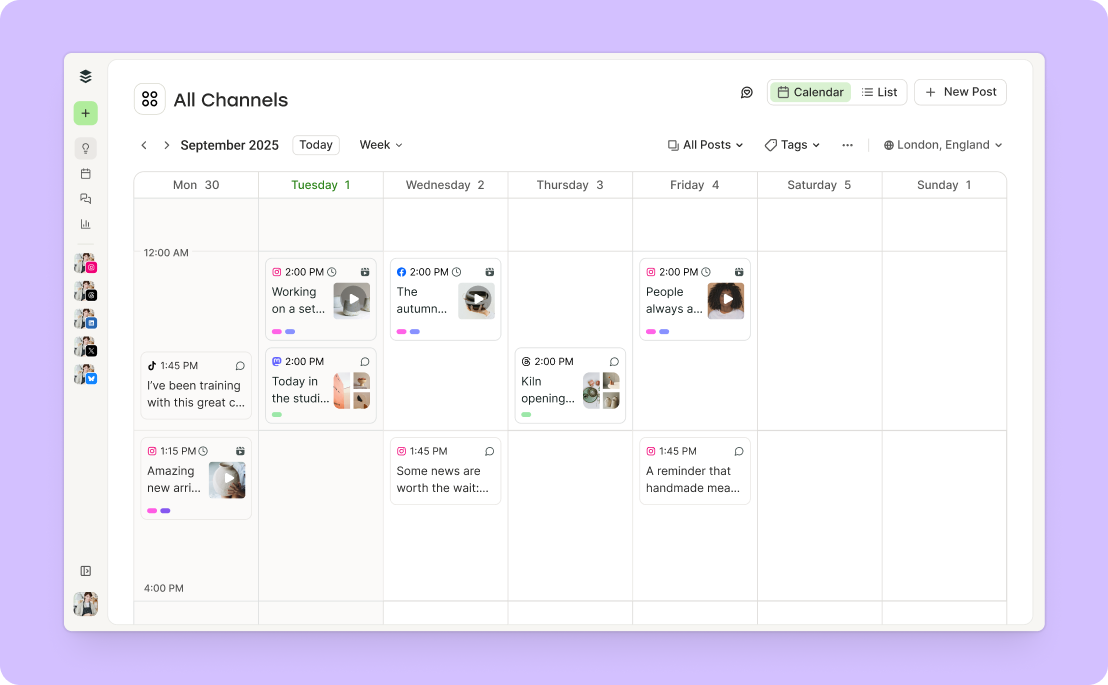
Buffer stands out as a top-tier alternative due to its flexible, per-channel pricing and a robust free plan. The free version allows users to connect up to three social platforms—including Instagram, Facebook, LinkedIn, TikTok, YouTube, Pinterest, Threads, Bluesky, Mastodon, and Substack—and schedule up to 10 posts per channel. These posts are automatically replenished as they are published, enabling a continuous workflow without manual re-scheduling.
One of Buffer’s strongest features is its real free plan, which is not a placeholder but a fully functional option. This allows creators and small businesses to test the platform without financial commitment. The free plan includes access to analytics, AI tools, and community engagement features, making it ideal for early-stage content planning and audience growth.
Buffer’s AI Assistant has no usage cap on any plan. This means users can brainstorm, rewrite, or repurpose content as often as needed without worrying about running out of credits. This is a major advantage for teams that rely on AI to generate ideas or refine copy, especially when content creation is a high-volume, repetitive task.
For teams, Buffer offers a Team plan that includes unlimited users and per-channel permissions. This allows teams to assign specific roles—such as who can publish, who needs approval, and who has no access—on a channel-by-channel basis. Approval workflows can be set up so that posts require sign-off before going live, ensuring alignment with stakeholders or clients.
The 14-day free trial allows users to experience the full suite of features before committing. This low-risk entry point makes Buffer accessible to a wide range of users, from solo creators to growing agencies.
Planable – Best for Approval-First Collaboration
Planable is specifically designed for teams where content must go through formal approval processes. It allows teams to define strict approval workflows at the workspace level—options include no approval, optional approval, one person required, or multiple people required to approve a post.
These rules can be customized per workspace, enabling different teams or departments to have different governance standards. For instance, a marketing team might require one approval, while a product team might require multiple sign-offs from different stakeholders.
Reviewers can approve posts via a link without needing to log into the full dashboard. This feature is particularly useful for clients or stakeholders who want to review content without navigating a full interface. It streamlines the approval process and improves accessibility for external parties.
Once a post is approved, it becomes locked. Media, captions, links, scheduled dates, and times cannot be modified. This ensures content integrity and prevents last-minute changes that could misalign messaging. If a change is needed, only an approver can unapprove the post, which reactivates editing permissions.
Planable includes version history for each post, allowing users to see the evolution of content and revert to earlier versions if necessary. This is invaluable for maintaining accountability and tracking changes over time.
Unlike Loomly, Planable does not offer a free plan. However, it provides a free trial of the first 50 posts with no time limit, allowing users to test the approval workflow without financial commitment. The entry plan includes unlimited users, meaning adding new team members does not increase the monthly cost.
Planable supports only Facebook, Instagram, LinkedIn, and TikTok. It does not offer coverage for platforms like X/Twitter or Pinterest, which may limit its usefulness for teams with broader social media strategies.
SocialPilot – Best for Agencies Offering White-Label Tools
SocialPilot is a powerful solution for agencies that want to offer social media management under their own brand. The platform allows agencies to customize the interface with their own name, logo, and color scheme, creating a seamless client experience.
Each client receives a personalized dashboard that reflects the agency’s branding. Reports are automatically generated and sent to clients with the agency’s name and logo, reinforcing trust and professionalism. Automated emails also appear to originate from the agency’s domain, which enhances credibility and client confidence.
White-labeling is available on higher-tier plans, and the free trial is 14 days long with no credit card required. This makes it easy for agencies to evaluate the tool without financial risk.
Agencies can share workspaces or provide clients with a direct link to review and sign off on posts without requiring them to create an account. This simplifies client onboarding and improves engagement.
Additional features include watermarking client logos on visuals to maintain brand consistency and granular team permissions that allow agencies to control what each team member can see and do.
It is important to note that white-labeling is not available for self-managed brands. The platform is primarily designed for agency use, where branding and client experience are central to service delivery.
Later – Best for Instagram-First Visual Planning
Later excels in visual content planning, particularly for creators and brands whose content strategy is centered around Instagram. Its grid preview allows users to see how a post will appear in the feed before it is scheduled, enabling a more intuitive and visual approach to content curation.
The drag-and-drop visual calendar makes it easy to rearrange posts until the feed looks balanced and aesthetically pleasing. This is especially useful for creators who prioritize visual storytelling and feed design over text-based content.
Users can add music to reels, invite collaborators, and tag other users directly from the composer. These features streamline content creation and enhance engagement potential.
Later supports Instagram and Facebook comments and direct messages (DMs) on team plans, allowing teams to manage audience interactions more effectively.
Like Loomly, Later does not support X/Twitter. This limitation means teams that are active on the platform must use a separate tool, which adds complexity to their workflow.
Later lacks the ability to schedule content via CSV file, which makes it less flexible for large-scale, campaign-level planning. This feature is often used by agencies to upload bulk content for coordinated launches, and its absence may limit Later’s utility for enterprise-level operations.
Agorapulse – Best for Proving Social Media ROI
Agorapulse is ideal for teams that need to demonstrate the return on investment (ROI) of their social media efforts. By connecting to Google Analytics, it tracks how individual posts, profiles, platforms, and even team members drive website traffic, leads, and sales.
For example, if a post includes a link to a landing page, Agorapulse can track how many visitors that post generates and whether those visitors convert into leads or purchases. This data allows teams to directly link social content to business outcomes.
Ad comments from Facebook, Instagram, LinkedIn, and TikTok appear in the same inbox as organic comments, enabling teams to monitor both types of conversations in one place. This integration helps maintain consistency in response and improves customer engagement.
It includes sentiment analysis, which tags comments as positive, negative, or neutral. This helps teams understand public perception and respond appropriately to feedback.
While Agorapulse offers powerful analytics, its custom report builder requires some technical setup and may not deliver quick, intuitive insights. This can be a barrier for users who want immediate, actionable data without configuration.
There is no free plan. The entry plan starts at $99 per user per month, making it one of the more expensive options on the list. This pricing model becomes particularly costly for large teams, as each user is billed individually.
Hootsuite – Best for Enterprise Customer Conversations
Hootsuite is designed for enterprise teams that manage a high volume of customer conversations across multiple platforms. Its unified inbox brings together comments, direct messages, ad comments, and support requests from Facebook, Instagram, X, LinkedIn, TikTok, Threads, and WhatsApp into a single interface.
Teams can assign any conversation to a specific member and add notes for context, ensuring that team members receive full background information before responding. This is especially useful in customer service or support environments where context matters.
Information masking is available on all plans and helps protect sensitive data by hiding personal information in messages. This feature is critical when customers share personal details during support requests.
Keyword-based automation allows teams to reply to comments and DMs automatically, reducing response times and improving customer satisfaction. Teams can also monitor reply times and customer satisfaction metrics to evaluate performance over time.
Hootsuite offers social listening and ad performance tracking across major platforms, giving teams visibility into both organic and paid content performance.
Pricing starts at $149 per user per month, making it one of the most expensive tools on the list. This high cost may limit its adoption for small or mid-sized teams, though it is well-suited for large enterprises with complex customer engagement needs.
Sprout Social – Best for Social Listening
Sprout Social is a powerful tool for brands that want to understand what people are saying about them on social media—even when they don’t tag the brand. It uses social listening to build searches around brands, products, or topics of interest and track conversations across Facebook, Instagram, X/Twitter, LinkedIn, YouTube, Reddit, and Tumblr.
This capability allows brands to identify emerging trends, detect public sentiment, and gather unfiltered feedback from their audience. For example, a brand might monitor conversations about a new product launch or competitor pricing to stay ahead of market shifts.
It also supports competitor monitoring, enabling brands to observe public sentiment about rivals. This helps in strategic planning and market positioning.
One of the few tools on this list that supports Snapchat, Sprout Social also connects to review sites like Glassdoor and Yelp, allowing brands to monitor customer reviews in real time.
However, social listening is not included in the base plan. It is a paid add-on available from the Standard plan at $199 per seat per month. This adds an extra cost and may deter smaller teams from adopting the tool.
Like Agorapulse and Hootsuite, Sprout Social bills per user. This pricing model can become expensive for large teams, especially when combined with add-ons like social listening.
Metricool – Best for Analytics and Reporting
Metricool is ideal for teams that want to combine organic social posts, paid ad performance, and website traffic into a single, unified report. It allows users to manage Meta, Google, and TikTok ad performance alongside organic content, providing a holistic view of content performance.
By tracking which posts drive website traffic, Metricool helps identify which content is most effective at driving engagement and conversions. This insight is critical for optimizing content strategies and advertising budgets.
Users can build custom reports, export them as PDF or PowerPoint files, or schedule them to be delivered monthly to stakeholders. This automation ensures consistent reporting without manual effort.
It integrates with Data Studio (formerly Looker Studio), allowing users to create advanced, customizable dashboards that go beyond basic metrics.
While the entry plan includes basic analytics, full features such as custom reports, complete X analytics, and advanced AI capabilities require a higher-tier plan or a paid add-on.
One notable limitation is that Metricool’s queue-style scheduling is limited to autolists, which are designed for recycling evergreen content. It does not support scheduling regular, recurring content through a traditional content queue, which may be a drawback for teams that rely on consistent, scheduled posting.
How to Choose the Right Alternative
Selecting the best tool depends on how your team operates daily. The following questions can help narrow down options based on real-world needs.
- What’s your budget, and how will it grow? Buffer offers flexible pricing per channel, starting at $6 per channel. Later and Metricool have free plans. Per-user pricing at Agorapulse, Hootsuite, and Sprout Social adds up quickly. Buffer and Planable offer unlimited users on team plans, making them more scalable as teams grow.
- How central are approvals to your process? Planable is ideal for teams where sign-off is a core part of workflow. Buffer’s Team plan includes per-channel permissions and approval workflows, allowing teams to manage content with both publishing and review controls.
- Are you an agency? SocialPilot is specifically designed for agencies to offer branded client experiences. Planable allows clients to approve posts via a link without logging in. Buffer supports unlimited client channels, making it ideal for managing multiple client accounts efficiently.
- Do you post on X/Twitter? Buffer, SocialPilot, Hootsuite, and Sprout Social support X/Twitter natively. Metricool and Agorapulse offer it as a paid add-on. This is a key consideration for teams with a strong presence on the platform.
- How busy is your inbox? Hootsuite unifies customer conversations from multiple platforms into one inbox. Agorapulse keeps ad and organic comments together. Buffer’s Community inbox includes AI-powered reply suggestions, helping teams respond faster to comments and mentions.
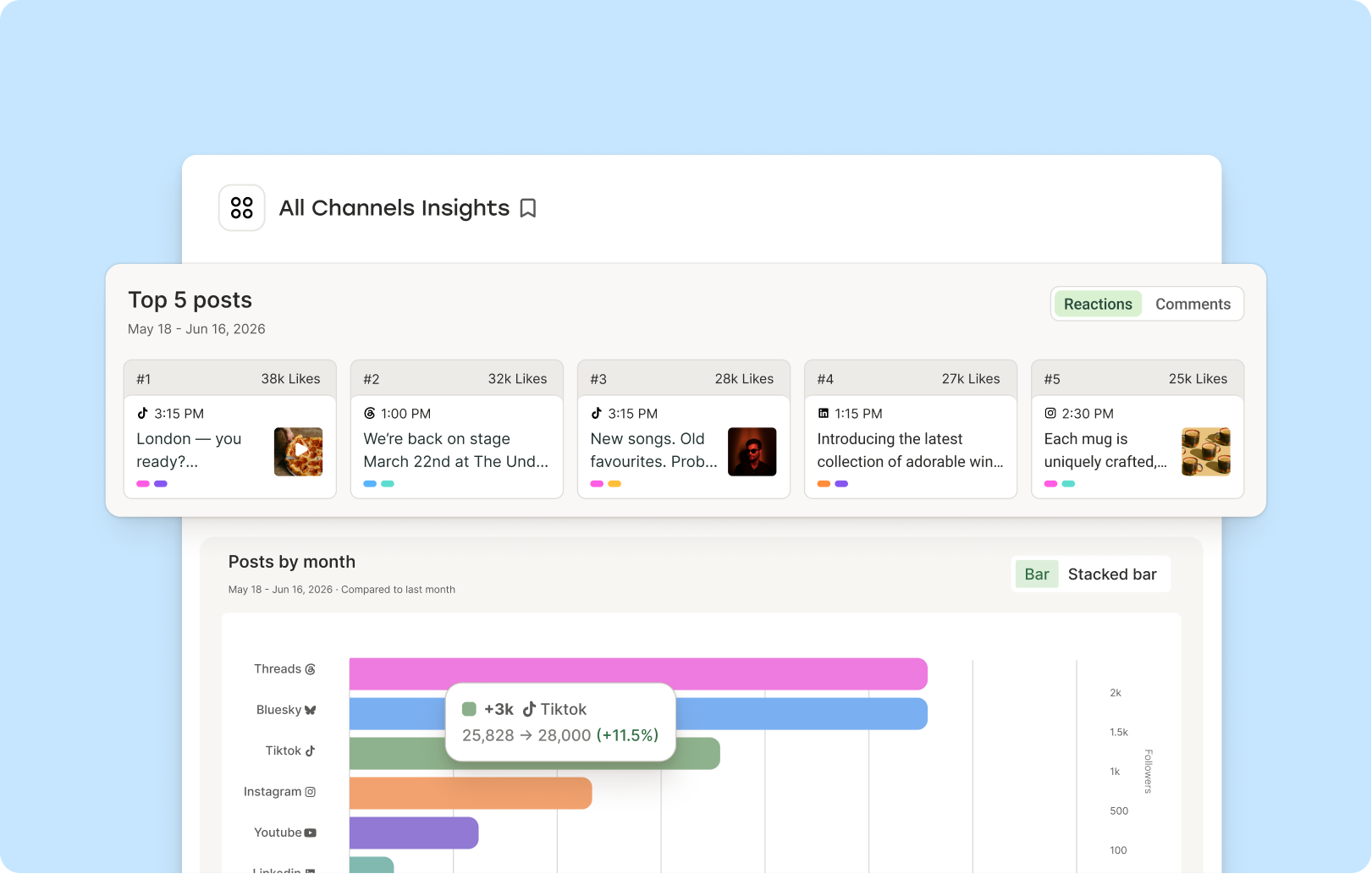
- How deep do you go on analytics? Metricool offers detailed reports that combine social, paid ads, and website traffic. Agorapulse ties posts to leads and sales, proving ROI. Buffer’s Insights includes AI-powered takeaways that suggest actionable next steps.
- Is Instagram your main channel? Later’s grid preview is ideal for feed-first planning. Buffer and Hootsuite offer Instagram DM automation, helping teams respond to direct messages more efficiently.
Before committing to a tool, test two or three options alongside Loomly for a couple of weeks. This hands-on evaluation helps determine which tool performs best in real-world workflows.
Buffer offers both a free trial and a free plan. Other tools offer free trials or free tiers, allowing low-risk testing. This makes it possible to evaluate features without financial commitment.
Key Limitations and Trade-Offs
Each alternative has clear limitations that should be considered before adoption.
Buffer’s free plan is limited to three channels and 10 posts per channel. It lacks advanced features like deep analytics or social listening, which may not meet the needs of larger or more complex teams.
Planable only supports Facebook, Instagram, LinkedIn, and TikTok. It does not cover platforms like Pinterest or X/Twitter, which may limit its usefulness for diversified social strategies.
White-labeling is only available on higher-tier plans in SocialPilot. It is not designed for self-managed brands, making it less relevant for independent creators.
Later lacks CSV scheduling, which reduces flexibility for large-scale, campaign-level planning. This feature is essential for agencies managing multiple content launches.
Many tools charge per user or per seat. Hootsuite and Sprout Social start at $99–$149 per user per month, which can become prohibitively expensive for large teams.
Some features, such as social listening or advanced analytics, are paid add-ons. These require additional investment and may not be accessible to all teams.
AI capabilities are often capped or not fully transparent. Loomly does not publish AI limits, which reduces predictability. In contrast, Buffer offers unlimited AI usage, making it more reliable for AI-powered workflows.
Final Recommendations and Next Steps
Choose a tool based on your team’s priorities. If formal approvals are central to your workflow, Planable is ideal. For visual planning, Later fits well. For proving ROI, Agorapulse is strong. For agencies, SocialPilot offers a branded client experience. For enterprise-level inbox management, Hootsuite is a solid choice. For detailed analytics, Metricool provides a comprehensive view of performance across platforms.
Always test with a free trial or free plan before committing. Use multiple tools for a few weeks to compare real-world performance. This ensures that the selected tool aligns with your team’s actual workflow and goals.
Published content remains on social platforms. Switching tools does not delete posts. To preserve content, connect your accounts to the new tool before canceling Loomly, and move over any scheduled posts that are still pending.
For more information on social media tools, see Buffer’s Instagram features or Facebook integration.
Shivani Shah, a SaaS content writer and editor, created this guide based on hands-on testing of multiple tools. She emphasizes practicality and real-world usability over marketing claims, ensuring that recommendations are grounded in actual user experience.
Sources & further reading
Featured image: 8 Best Loomly Alternatives to Try in 2026 (Free + Paid). Via original publisher. Image source