Designer Michael Flarup has launched IconSwapper, a Mac utility that lets users replace app icons with custom designs. The tool turns standard icons into dynamic visuals that respond to real-time activity.
What Happened
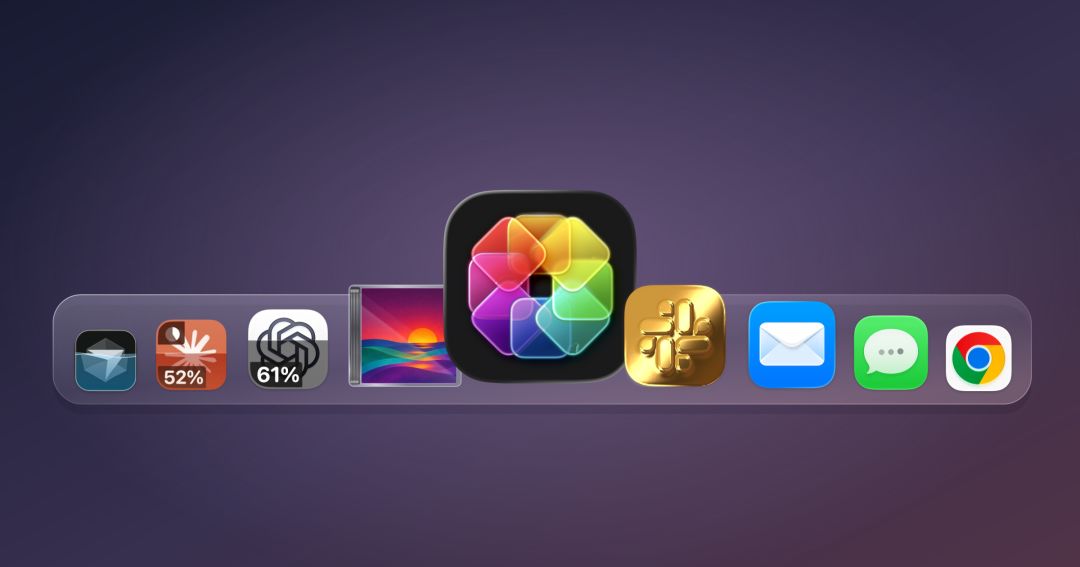
IconSwapper lets Mac users create custom app icons that show live AI usage. It works with apps like ChatGPT, Claude, and Cursor.
The icons display real-time metrics such as prompt count or session duration, helping users track AI activity without switching apps.
How It Works
IconSwapper doesn’t replace system icons. Instead, it draws custom visuals directly on them using Metal shaders in real time.
This method avoids altering macOS’s protected system files. It respects the operating system’s architecture while enabling deep personalization.
- The app works with macOS’s Dock and Command-Tab switching.
- It tracks actions like page loads, downloads, or cursor movement.
- Custom animations respond to user actions — such as light moving across an icon or an icon pulsing during AI processing.
Live AI Usage Features
Users can set AI app icons to show live data. For example, the icon might glow or pulse as AI activity increases.
The data comes from the app’s internal logs or API. It updates in real time, showing prompt counts or session length.
Fun Customizations
IconSwapper offers playful effects that add personality to the desktop.
- Safari’s compass moves when a page loads or a file downloads.
- Finder’s icon eyes follow your cursor across the screen.
- Music or Mail icons can animate — like a waveform pulsing with new messages or a note appearing when a song plays.
These effects are fun but not practical for daily use. They make the desktop feel more alive and responsive.
Background: Why This Matters
Flarup has designed Mac icons since the early 2000s. He wrote a book on app icon design and believes software should feel personal and expressive.
Before IconSwapper, macOS had no theming support. System icons were fixed and unchangeable. Flarup’s solution works around that by rendering visuals directly on icons.
Limitations and Considerations
IconSwapper doesn’t replace traditional tracking tools. Users can still check AI usage in app dashboards or with browser extensions.
The app only works for apps visible in the Dock or tab bar. Background services or hidden apps won’t show custom icons.
It requires a stable macOS version. Older versions may not support all features.
Why It Matters
IconSwapper shows how users can make digital tools feel more personal. It reflects a growing trend: making interfaces respond to human behavior.
For Mac users who value design, this app turns the desktop into a living, responsive environment that reacts to their actions.
What to Watch Next
Apple may add official theming support to macOS. If so, IconSwapper could shift from a workaround to a complementary tool.
Similar tools may emerge for Windows or mobile platforms. Real-time, personalized UIs could become standard in future software.
Source: TechCrunch
Sources & further reading
Featured image: original publisher image. Via original publisher. Image source