Check Point Research has identified a cyberattack campaign called Yoba. It uses the popularity of AI tools to spread malware that looks harmless at first. Source: securityaffairs.com.
How the Fake AI Projects Work
The attackers created fake GitHub projects named GPT-5.6 Sol, GPT-6 Astra, and Claude Opus. These names mimic real AI tools from OpenAI and Anthropic.
The projects use real GitHub infrastructure. This makes them appear legitimate to users and security tools alike.
Each project is optimized for search. Titles and descriptions are crafted to rank high in Google. This is known as SEO poisoning.
Timeline and Geographic Obfuscation
The first malicious releases appeared on August 30 and 31, 2026. A third release followed on September 4.
Each repository uses a different email address. Commit times span UTC+4, UTC-4, and UTC+3. This hides the attackers’ true location.
Malware Delivery via DLL Sideloading
Each ZIP file includes a legitimate Setup.exe from OpenAI or Anthropic. It is digitally signed and trusted by systems.
The malware uses DLL sideloading. The Setup.exe loads a malicious winmm.dll file directly from the ZIP.
This technique bypasses security checks. The system treats the signed app as safe, allowing the malware to run.
Evading Sandboxes and Detection
The YobaDropper checks the name of the launching program. It only continues if the name is Setup.exe.
In sandboxes, the program is often launched under a different name. This causes the dropper to fail.
Instead of crashing, it sleeps for 12.73 days—200,000 iterations of 5.5 seconds each. This avoids detection in automated analysis.
Geographic Targeting and Exclusion
The malware checks the keyboard layout to avoid certain regions.
It excludes Russian, Belarusian, Tajik, Armenian, Azerbaijani, Georgian, Kazakh, Kyrgyz, Turkmen, Uzbek, and Tatar languages.
Ukraine is not on the list. This may reflect a deliberate choice to avoid political escalation.
Administrator Privileges and Installation
Before installing, the malware asks for administrator rights.
If the user lacks them, it shows a message: ‘Please run this program as Administrator’ and exits.
The user must restart the app with admin rights to proceed.
Establishing Persistence
After installation, the malware creates a folder named WMProcess under ProgramData.
It copies a real WMPDMC.exe file from System32 and replaces it with a malicious wmpdui.dll.
It sets up a scheduled task labeled as Microsoft. It runs three minutes after boot and uses Local System privileges.
When triggered, it launches WMPDMC.exe, which loads the malicious DLL through DLL sideloading.
Second-Stage Payload: YobaLoader
The YobaLoader shares code with the dropper. This suggests a common origin.
It runs only under WMPDMC.exe and uses a different hash seed. This helps avoid detection by security tools.
Dynamic Domain Generation and Payload Retrieval
It downloads the profile picture from Telegram channel t[.]me/yoba_fanclub.
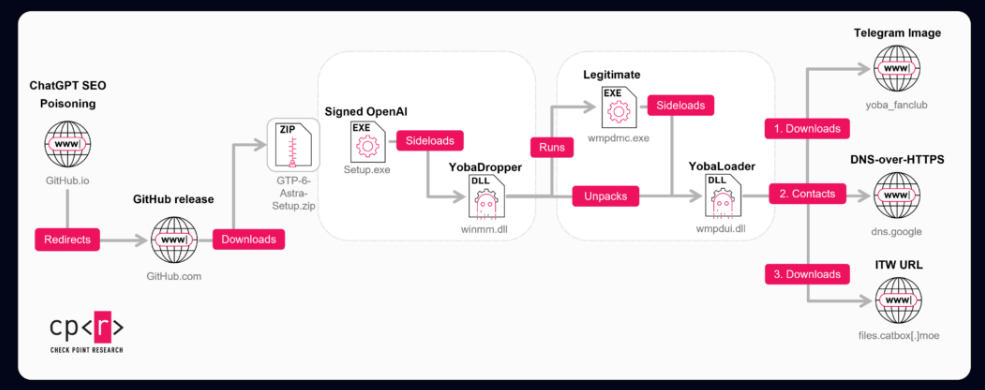
The last 50 bytes of the image seed a domain using a word list in the format adjective-noun-verb-number.
The domain is hosted on dedyn[.]io, a dynamic DNS service that rotates domains quickly.
Secure DNS Query and Payload Download
The YobaLoader queries Google’s DNS-over-HTTPS service for a TXT record.
The response is signed. The loader verifies the signature before decrypting the payload.
The final payload is hosted on Catbox, a low-visibility file hosting service.
Execution Options and Flexibility
The operator can choose how to run the payload. Options include:
- Injecting it into svchost.exe
- Creating a hidden PowerShell script
- Saving a compiled executable after removing the Zone.Identifier mark
This flexibility allows the attackers to adapt to different environments.
Final Payload: A Cryptocurrency Miner
The final payload is XMRig 6.26.0, a cryptocurrency miner.
It connects to a TLS-enabled onion mining endpoint via a local Tor SOCKS5 proxy.
It uses about 85% of CPU threads. This can severely impact system performance.
It pauses when user activity is detected. It resumes after 240 seconds of inactivity.
It can load the WinRing0 driver to optimize mining using MSR techniques.
Broader Threat: Beyond Mining
The YobaLoader’s DNS-based system allows operators to deliver any PE executable or PowerShell payload.
Future attacks could include ransomware, backdoors, or data exfiltration tools.
This shows how AI-driven malware can evolve beyond simple mining.
Earlier Versions and Evolution
Earlier versions used Cursor.exe for sideloading and relied on startup shortcuts for persistence.
They excluded only Russia and used .aber[.]ir instead of dedyn[.]io.
They included anti-debugging and anti-VM checks. These were dropped in later versions.
Attribution and Detection
Check Point Research believes the attackers may have Russian origins and operate in the UTC-4 time zone.
This is a working hypothesis, not a confirmed attribution.
What Defenders Should Watch For
Look for these signs of compromise:
- Suspicious WMPDMC.exe copies in ProgramData
- Fake Microsoft scheduled tasks
- Unusual Telegram-related traffic
- DNS lookups for dedyn[.]io via dns.google
- Unexplained high CPU usage
These can be detected through endpoint monitoring and network analysis.
The Yoba campaign shows how attackers exploit trust in AI tools. They use real GitHub projects and well-known software names to appear legitimate.
Organizations should avoid installing AI tools from unverified sources. Enforce policies that restrict execution of software from unknown repositories.
As AI tools grow in popularity, such attacks will become more common. User awareness and basic technical controls remain essential.
Sources & further reading
Featured image: Yoba malware. Via original publisher. Image source