Apple has started beta testing new AI features on the Apple Watch. These features, part of Audio Intelligence, were first shown at the company’s Surprise and Shine event in September. They are now available to developers via the iOS 27.3 update. Source: techcrunch.com.
The features work only on Apple Watch Series 12 and Apple Watch Ultra 4. Users must manually enable each of the four AI functions—Live Rewind, Siri Recaps, Sound Recognition, and Song Recognition—to use them.
Key Features and Their Uses
Sound Recognition helps deaf or hard-of-hearing users. It detects important sounds like sirens, alarms, and doorbells. The feature uses the watch’s microphone and on-device AI to identify these sounds in real time.
Song Recognition uses Apple’s Shazam technology. It detects music playing in the background and shows the song title and artist. This helps users quickly identify music during events or travel.
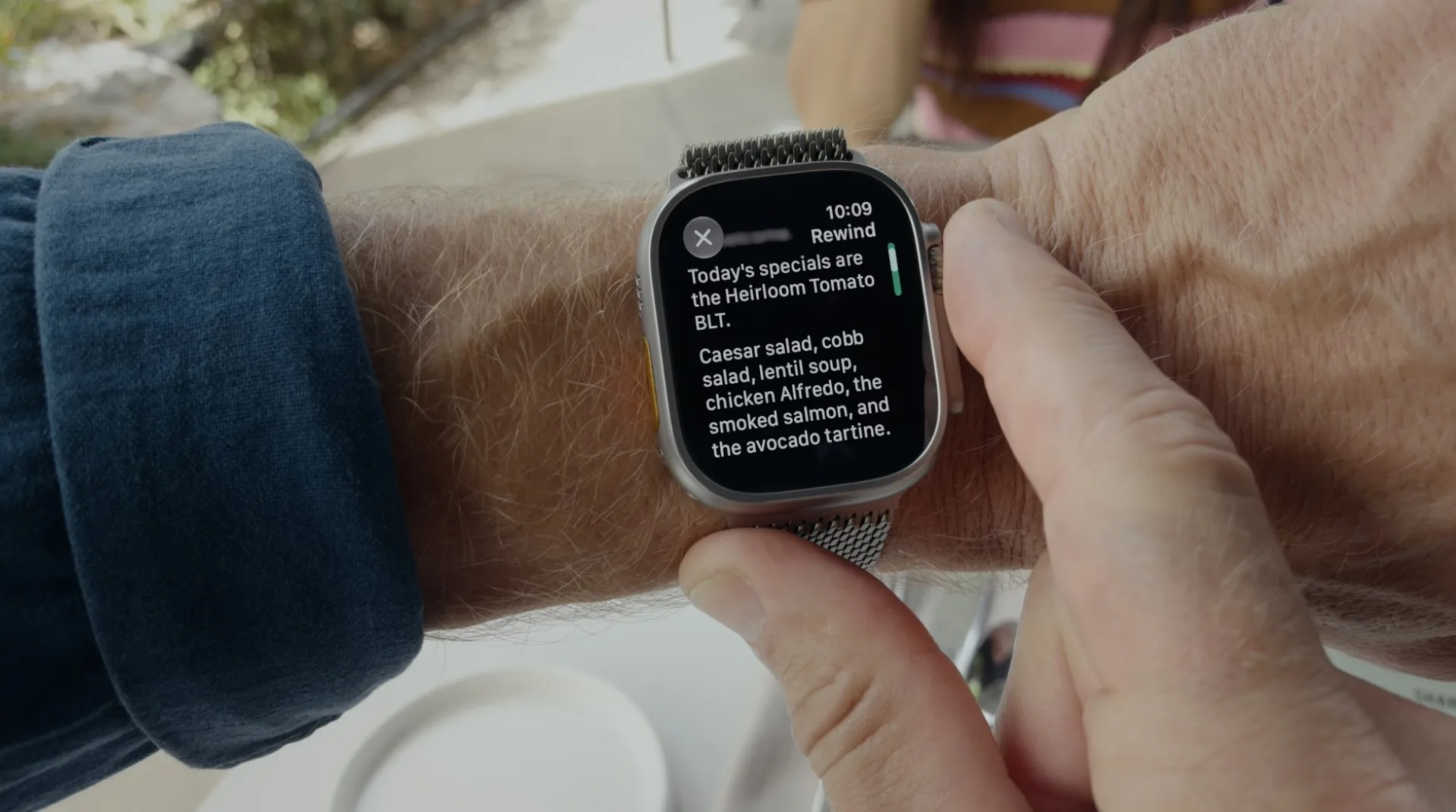
Live Rewind lets users see the last 15 seconds of a conversation. Double-press the digital crown to activate it. A chime and animation appear, signaling others that a recording started. The snippet is deleted after 30 seconds if not saved. It can be stored in the Siri app for later use.
Siri Recaps creates short summaries of conversations. When a conversation happens, the watch sends a condensed version to the iPhone. AI removes filler words and highlights key points like deadlines, pricing, or dates. The summary is encrypted and sent to Apple’s Private Cloud Compute. It is deleted from there immediately.
How Privacy and Security Are Maintained
The raw audio is never stored on the Apple Watch or accessible to the operating system. It’s processed in a secure enclave—a hardware-protected space that can’t be accessed by the rest of the system.
Only the processed text is sent to the iPhone. This text is encrypted and sent to Apple’s Private Cloud Compute. After the recap is created, it is deleted from the cloud. No raw audio or full transcripts are kept.
Apple filters out sensitive data like government IDs, financial details, and self-harm language. These are excluded from the summaries to protect user privacy.
Users can set a schedule for Siri Recaps—like only during work hours or never at night. The feature can be turned off anytime via the Control Center.
When the user unlocks their Apple Watch in the morning, a reminder appears. It prompts them to review any saved recaps. If they save one, it can go to the Notes or Journal app. If no action is taken, it deletes itself in seven days.
Limitations and Real-World Use
Live Rewind only captures the last 15 seconds. It doesn’t work when using headphones or noise-canceling features.
Siri Recaps summarizes facts but doesn’t capture tone or emotion. It works best in structured settings like meetings or parent-teacher conferences.
These features are still in beta. They are not yet available to the public.
Apple says the features won’t drain battery life. On-device processing and hardware efficiency help keep power use low.
Why This Matters in the AI Landscape
Apple’s approach shows a growing trend: balancing AI usefulness with user trust. After devices like Meta’s AI glasses faced backlash for recording without consent, Apple focuses on summaries and privacy.
The feature avoids speaker identification, raw audio storage, or full transcriptions. It creates short sentences and bullet points with key facts—like deadlines or prices—without emotional context.
One user said it captured key points from a parent-teacher meeting. Another recalled a restaurant pricing structure they’d otherwise missed.
Raw audio stays on the watch. Only processed text moves to the iPhone. After summarization, it’s deleted from Apple’s cloud. No data remains in Apple’s systems.
Users can set times when the feature runs. This lets them use it during work hours without it activating at night or during personal time.
When enabled, the morning unlock prompt reminds users to review saved recaps. They can choose to save it or let it disappear. If no action is taken, it deletes in seven days.
Apple confirms the feature stops when users use noise-canceling headphones or listen to music. This avoids capturing private or sensitive audio.
These features help users remember key details without writing notes. They make devices more intuitive and responsive to real-world situations.
As beta testing continues, Apple will collect user feedback. This may shape future updates that improve functionality while keeping privacy strong.
Sources & further reading
Featured image: original publisher image. Via original publisher. Image source